
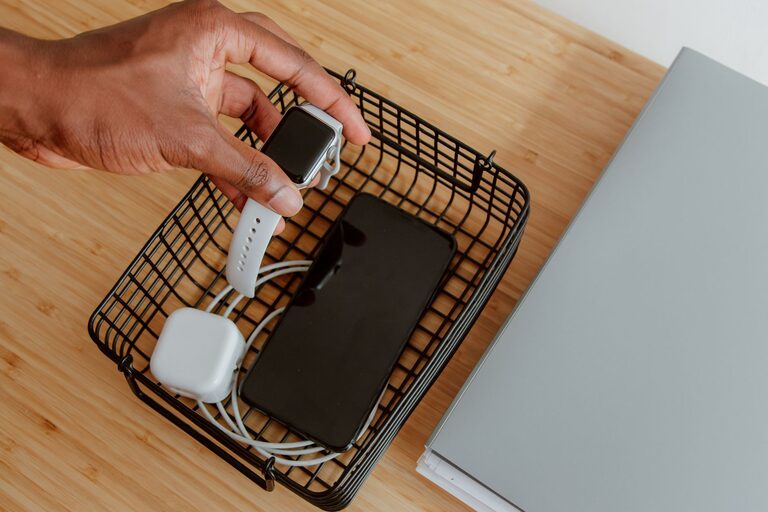
A dedicated charging station can make everyday life easier. Instead of searching for cables or filling several outlets around your home, you can keep phones, tablets, watches, earbuds, and other devices together in one convenient place.
The best charging station does more than reduce clutter. It keeps cables organized, makes devices easy to find, and provides a consistent place to recharge them. With a few basic supplies and some planning, you can create a setup that fits your space and your devices.
Choose the Right Location
Start by selecting a location that is convenient but not in the way. Common choices include a bedside table, kitchen counter, entryway shelf, home office desk, or living room cabinet.
Look for a spot with:
– Easy access to a wall outlet
– Enough space for your devices
– A stable, flat surface
– Good airflow around power adapters
– Protection from water and heat
– Enough room to connect and remove cables
Avoid placing a charging station near sinks, bathtubs, heaters, stovetops, or areas where drinks are likely to spill. Also avoid locations where cables could become a tripping hazard.
Think about when and where your household usually charges devices. A bedroom setup may work well for phones and watches, while a home office station may be better for laptops, tablets, and work accessories. If several people use the station, choose a central location with enough room for everyone.
List the Devices You Need to Charge
Before buying equipment, make a list of the devices that will use the station. This helps you select the right number of ports and the correct cables.
Your list might include:
– Smartphones
– Tablets and e-readers
– Wireless earbuds
– Smartwatches
– Cameras
– Portable game systems
– Headphones
– Rechargeable batteries
– Laptops or other small electronics
Check which charging connectors each device uses. Common options include USB-C, USB-A, and specialized charging docks. Some devices may also support wireless charging.
You do not need to charge every device in one place. Large electronics, such as laptops, may be more practical at a desk, while smaller devices can share a compact station elsewhere.
Select a Suitable Power Source
The power source is the foundation of your charging station. You can use a standard wall charger, a multiport USB charger, a power strip with USB ports, or a charging dock designed for several devices.
When comparing options, consider:
– The number of charging ports
– The connector types supported
– The power needed by your devices
– The length of the power cord
– Built-in safety features
– The size and placement of the unit
A multiport charger can reduce clutter because several cables connect to one compact adapter. Choose a reputable product with clear specifications and basic protections against problems such as overheating, overcurrent, or short circuits.
Do not overload a power strip by connecting too many high-power products. A charging station is generally intended for small electronics, not appliances such as heaters, coffee makers, or kitchen equipment.
If you use a power strip, place it where the switch and plug remain easy to reach. Avoid hiding it under rugs, inside tightly packed drawers, or behind furniture where heat cannot escape.
Plan the Layout
A well-planned layout keeps devices visible and cables easy to use. You can place the charger at the back of a shelf or desk and run each cable toward the front.
Useful organization options include:
– A desktop charging dock
– Small baskets or trays
– Divided storage boxes
– Cable clips
– Adhesive cable holders
– Velcro cable ties
– A drawer with cable openings
– A stand with separate slots for devices
If several people share the station, assign each person a section or container. This prevents devices and cables from becoming mixed together.
Keep enough space between devices so they do not rest on top of one another. Phones and tablets may become warm while charging, so avoid stacking them in a way that blocks airflow.
Organize and Label the Cables
Cables are often the main source of charging-station clutter. Start by removing damaged, tangled, or unnecessary cables. Keep only the cables that match your current devices.
Use cable clips to guide cords along the back or edge of a desk. Velcro ties can bundle extra length, but avoid wrapping cables too tightly. Leave enough slack to connect and disconnect devices without pulling on the cable or port.
Labels can make shared charging stations easier to use. Add a small label to each cable, such as “phone,” “tablet,” or “watch.” You can also use different colored ties to identify cables quickly.
Keep spare cables in a separate container rather than placing them in the active charging area. Store them loosely and away from moisture or extreme temperatures.
Add Wireless Charging Carefully
Wireless charging can reduce the number of visible cables, especially for compatible phones, watches, and earbuds. A wireless charging pad or stand can be placed at the front of the station for quick access.
Before using one, confirm that the device supports the same wireless charging standard as the pad. Remove thick cases or metal accessories if they interfere with charging.
Place the device in the correct position on the pad and check that the charging indicator appears. If the device becomes unusually warm, stops charging, or repeatedly disconnects, move it off the pad and check the instructions from the manufacturer.
Wireless charging is convenient, but it may not be the fastest option for every device. Keep a wired cable available when you need quicker charging or when a device does not support wireless charging.
Follow Basic Charging Safety Practices
A few simple habits can help keep the station reliable and safe:
– Use chargers and cables designed for your devices.
– Replace cables with exposed wires, cracked insulation, or damaged connectors.
– Keep liquids away from the charging area.
– Do not cover power adapters with clothing, papers, or other items.
– Leave ventilation space around chargers.
– Unplug equipment that becomes unusually hot, smells unusual, or makes strange sounds.
– Keep the station away from children and pets if loose cables or small accessories could be a concern.
– Avoid forcing a connector into a device.
– Do not use a damaged wall outlet or loose extension cord.
It is also helpful to check the station occasionally. Dust can collect around outlets and adapters, so clean the area with the power disconnected and follow the cleaning instructions for each product.
Make the Station Easy to Maintain
Your charging station should be simple enough to use every day. If it becomes difficult to reach, identify, or connect a cable, the setup may need a small adjustment.
Once a week or every few weeks, take a minute to:
- Return devices to their usual places.
- Untangle and secure loose cables.
- Remove devices that no longer belong there.
- Check for damaged cords or adapters.
- Wipe dust from the surface.
- Confirm that the charger still has enough ports for your needs.
Avoid filling the station with every electronic accessory you own. A smaller setup is usually easier to manage and keeps the area from becoming another storage space.
Build a Setup That Fits Your Routine
There is no single perfect charging station. A small tray with two cables may be enough for one person, while a family may need several sections, extra ports, and separate charging areas.
Start with the devices you use most often and add accessories only when needed. Choose a location that supports your daily routine, organize cables so they are easy to identify, and leave enough space for safe airflow.
With the right layout and a few regular maintenance habits, a charging station can keep devices powered, reduce clutter, and make your home or workspace more convenient.